 Free IPTV Playlists
Looking for active Xtream Codes IPTV Logins with working server URLs, usernames, passwords, and API endpoints? This permanent Xtream Codes IPTV Logins hub is updated regularly with tested panel credentials for live channels, VOD movies, and series—ready for IPTV Smarters Pro, TiviMate, XCIPTV, and VLC Media Player.
1. Working Xtream Codes IPTV Logins
Enter the Server / Host URL, Username, and Password from the tables below into any Xtream Codes compatible IPTV player. Always include http:// or https:// exactly as shown.
Panel Group A — Live TV & Sports Logins
Panel Group B — International & VOD Logins
2. Xtream Codes API Endpoints & Direct URLs
Behind every set of Xtream Codes IPTV Logins sits a standard API structure used by apps and custom players to fetch account info, live categories, VOD catalogs, and EPG data:
Player API (JSON):  http://HOST:PORT/player_api.php?username=USER&password=PASS
M3U Playlist URL:  http://HOST:PORT/get.php?username=USER&password=PASS&type=m3u_plus&output=ts
XMLTV EPG Guide:   http://HOST:PORT/xmltv.php?username=USER&password=PASS
3. How Xtream Codes IPTV Logins Work & Convert to M3U
Unlike a static playlist file, Xtream Codes IPTV Logins authenticate your session directly against the server’s API. This lets your IPTV app organize live TV, movies, and series into separate tabs, check account expiration details, and pull category lists dynamically without downloading massive text files manually.
If a player only accepts an M3U link instead of separate login fields, you can build the M3U URL yourself by placing the host and port at the beginning and appending /get.php?username=YOUR_USER&password=YOUR_PASS&type=m3u_plus&output=ts. Make sure there are no extra spaces or trailing slashes before /get.php.
4. Setup Guide: How to Enter Xtream Codes Logins
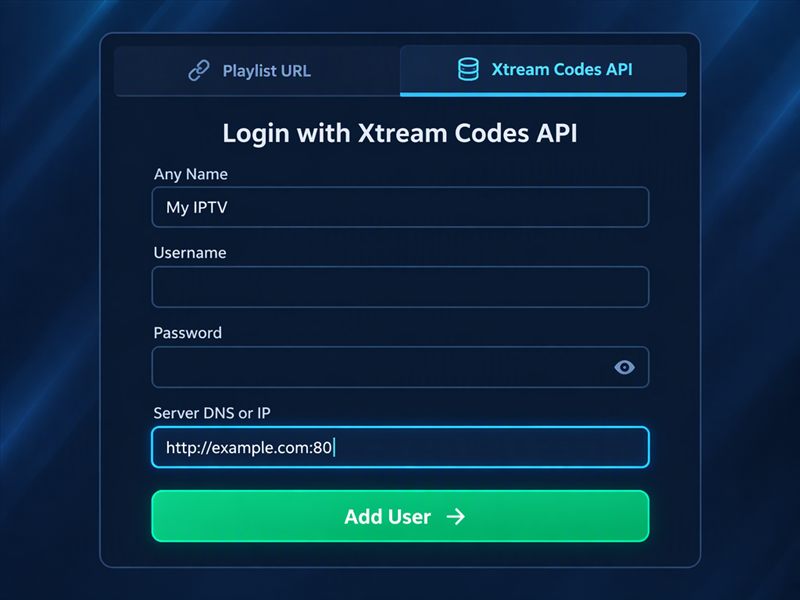
IPTV Smarters Pro & TiviMate (Firestick / Android / Windows)
- Launch your IPTV app and choose Login with Xtream Codes API (or Add Playlist → Xtream Codes in TiviMate).
- Type a profile name (such as Xtream Panel), then enter the exact Server / Host URL, Username, and Password.
- Confirm that no accidental spaces were added when copying from the table or keyboard auto-correct.
- Click Add User / Next and wait for Live TV, VOD, and EPG data to finish loading.
5. Frequently Asked Questions
Why do Xtream Codes IPTV Logins stop working or show invalid credentials?
Public demo or shared accounts often have short validity periods or connection limits. When an account expires or reaches its max active connections, switch to another row in the table above.
Should I use HTTP or HTTPS in the Host URL?
Use the exact protocol listed in the login table. Many IPTV panels run on custom ports using http://, and changing the scheme or port manually can prevent the API from responding.
Why do streams freeze during peak evening hours?
High concurrent traffic during prime-time matches or popular releases can cause buffering. Try another server row, lower the stream resolution if your player supports it, or increase the player buffer setting.


Leave a Reply