 Free IPTV Playlists
Looking for working Direct M3U8 Live Stream Links to play individual live TV channels, sports feeds, and 24/7 broadcasts without loading a massive playlist file? This permanent Direct M3U8 Live Stream Links hub is updated regularly with tested HLS stream URLs that open cleanly in VLC Media Player, TiviMate, IPTV Smarters, mobile players, and web stream testers.
.m3u8) | Compatibility: Desktop, Mobile, TV & Web Players1. Tested Direct M3U8 Live Stream Links by Category
Each entry below points directly to an .m3u8 manifest URL so you can open a single stream right away, test stability on your network, or bookmark specific channels.
https://stream-hls1.example.com/sports/live01.m3u8
2. How Direct M3U8 Live Stream Links Work (HLS & Adaptive Bitrate)
An .m3u8 file is a UTF-8 encoded playlist index used by HTTP Live Streaming (HLS). Rather than delivering a single unbroken file, it points your player to short video segments (often .ts or .m4s chunks) and sometimes references multiple quality variants so the player can adapt automatically to changing bandwidth.
Because Direct M3U8 Live Stream Links target one channel feed at a time, they are lightweight, fast to start, and easy to test in media players or HLS-capable web players. Keep in mind that some HLS feeds enforce referrer checks, token expiration, or geographic restrictions, which is why testing a backup link is helpful when a stream fails to load.
3. Player Guide: How to Open Direct M3U8 Live Stream Links
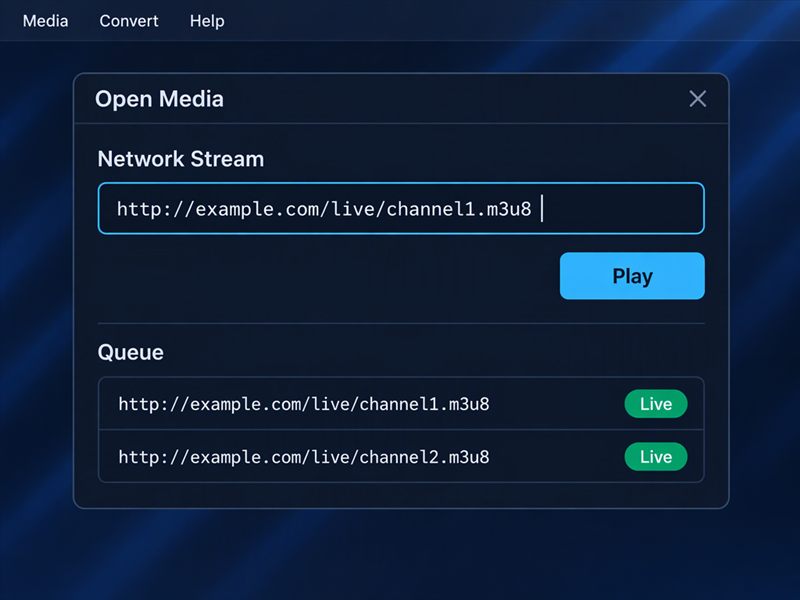
Desktop & Mobile Players (VLC, MX Player, IINA)
- Copy a full
.m3u8URL from the table above without trailing spaces. - In VLC, open Media → Open Network Stream (or press
Ctrl + N/Cmd + N). - Paste the
.m3u8address and click Play to start buffering the live segments.
TV & IPTV Apps (TiviMate, IPTV Smarters, OTT Navigator)
- Add the stream URL as a single channel/stream entry or inside a custom M3U playlist.
- If playback stutters on slower connections, select a lower bitrate variant or increase the player buffer.
- Bookmark this page to check for refreshed Direct M3U8 Live Stream Links whenever an older feed goes offline.
4. Frequently Asked Questions
Why does an .m3u8 link open in VLC or an IPTV app, but not in a regular browser tab?
Not all desktop web browsers natively play raw .m3u8 HLS playlists without an HLS player library or extension. Media players like VLC and dedicated IPTV apps handle HLS segment playlists much more reliably.
What causes a Direct M3U8 Live Stream Link to stop or show a 403/404 error?
Public live stream URLs can expire when source servers rotate tokens, change paths, or hit capacity limits. Switch to another row in the table above when a feed stops responding.
What is the difference between an .m3u8 link and a full M3U playlist?
A full M3U playlist bundles many channels (often across countries and categories) into one list, while a direct .m3u8 link usually targets a single live stream feed.


Leave a Reply