 Free IPTV Playlists
Looking for reliable Sport Live IPTV streams for football, basketball, motorsports, and international live TV? This permanent Sport Live IPTV hub is updated regularly with tested Match Playlists, country-organized sports channels, and working XMLTV EPG program guides—built for smooth playback on TiviMate, IPTV Smarters Pro, VLC Media Player, and Smart TVs.
1. Daily Sport Live IPTV Match Playlists
Dedicated event playlists focus exclusively on live match feeds (Premier League, Champions League, La Liga, Serie A, NBA, UFC, and Formula 1) to reduce playlist size and speed up channel loading.
http://your-server-domain.com/get.php?username=SPORT_USER&password=SPORT_PASS&type=m3u_plus&output=ts
2. Live TV Sports Channels by Country
Prefer regional Sport Live IPTV broadcasts in your native language? Use the country-grouped M3U links below for faster channel zapping without clutter.
3. Electronic Program Guide (XMLTV EPG URL)
Adding an EPG URL displays live kickoff times, current match titles, and upcoming sports schedules inside your IPTV app. Paste the XMLTV link below into your player’s EPG settings:
http://your-server-domain.com/xmltv.php?username=SPORT_USER&password=SPORT_PASS
4. Choosing the Right Sport Live IPTV Stream Format
When setting up Sport Live IPTV streams across different devices, picking the right playlist format and stream container makes a noticeable difference in stability. Standard M3U playlists work well for bundled channel lists, while country-filtered feeds load faster on lower-powered streaming sticks and older smart TVs. If you open individual channels in a media player or browser, direct M3U8 links can also be tested quickly before adding full lists.
An active XMLTV EPG feed turns a plain list of sports channels into an organized program guide. Instead of guessing which match is currently airing, you can browse upcoming fixtures, check channel lineups by region, and switch between live broadcasts with less trial and error. Always verify that your player’s time zone offset matches your local clock so kickoff times appear accurately.
5. How to Set Up Match Playlists & EPG on Your Player
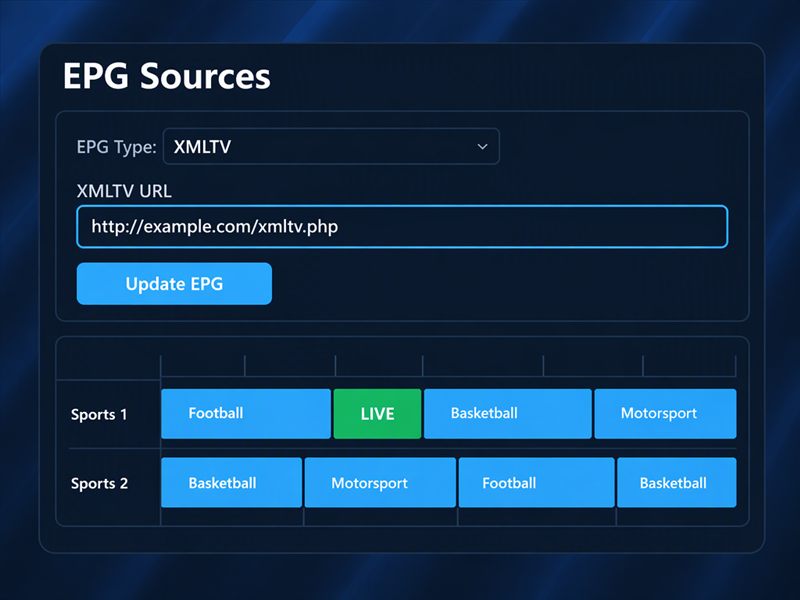
TiviMate & IPTV Smarters Pro (Android TV / Firestick)
- Open your IPTV player and select Add Playlist → M3U Playlist URL.
- Paste the Main Sports M3U URL (or your preferred country playlist) and name it Live Sports.
- Go to Settings → EPG → EPG Sources and paste the XMLTV EPG URL above.
- Click Update EPG and restart the channel guide to view live match timings.
6. Frequently Asked Questions
Why does a Sport Live IPTV stream buffer during big matches?
Peak traffic during major matches can overload public servers. Switch to a country-specific backup channel (for example, switching from UK to DE/ES sports feeds) or increase the buffer size in your player settings to Medium/Large.
How often are these sports playlists updated?
Links on this page are checked and refreshed regularly before major European and international kickoff windows. Bookmark this permanent URL instead of searching for new pages every day.
What if the EPG shows the wrong kickoff time?
Open your player’s EPG Time Offset setting and adjust it by +1 or -1 hour to match your local time zone.


Leave a Reply